NOCAP: Never Lose Scan Output Again
Every operator has the same dirty secret: a graveyard of unsaved scan output.
You ran NetExec against a subnet. Sprayed creds, got hits, saw Pwn3d! flash by. And then you realized you didn’t save it. Or you used --log but named it something useless and now it’s buried in the wrong directory alongside four other files with names you don’t recognize.
Every tool has its own output story. Nmap gives you -oA. NetExec has --log. Feroxbuster has -o. Gobuster has -o. Half your tools have nothing at all. You’re memorizing a different flag for every tool, manually naming files, manually routing to the right engagement directory — and when you forget any of it, the output is gone.
I got tired of this cycle. So I built NOCAP — a zero-dependency command capture wrapper that replaces all of it with one interface. One prefix. Every tool. No more per-tool output flags. No more | tee. No more thinking about where things go.
In my last post I talked about the philosophy: automate the repeatable, own your environment, iterate constantly. NOCAP is what happens when you take that philosophy and point it at the most common failure mode in offensive operations — losing your own output.
The Problem#
Here’s how it usually goes:
netexec smb 10.10.10.0/24 -u admin -p 'Password1' --shares
The output scrolls by. Share enumeration across a whole subnet — readable shares, write access, interesting findings. It’s all right there in your terminal. And then it’s gone. You could have added --log shares.txt, but you didn’t. Or you did, and now you have shares.txt, shares2.txt, and smb-shares-final.txt scattered across two directories.
- You forget the output flag (or the tool doesn’t have one) and the output is gone
- Every tool uses a different flag:
-oA,--log,-o,| tee— pick one and remember it for 250+ tools - You name files inconsistently across engagements
- You forget which directory you’re in and write to the wrong place
- You run the same scan with different flags and overwrite the first one
- You’re juggling three engagements and mix up client data
| teebreaks the TTY — your tool loses colors and progress bars
These aren’t hypothetical. It’s just another Monday.
The Fix#
cap netexec smb 10.10.10.0/24 -u admin -p 'Password1' --shares
That’s it. NOCAP captures the output, names the file netexec_smb_shares.txt automatically, routes it to the right engagement directory, preserves full terminal output (colors, progress bars, everything), and tells you where it went when it’s done.
No pipes. No thinking about filenames. No remembering directory structures.
Every capture starts with a structured header so you always know what generated the file:
Command: nmap -sCV 10.10.10.5
Date:    Mon Mar  3 14:30:52 EST 2026
---
Starting Nmap 7.94 ...
When the command finishes, NOCAP prints a one-line completion status with the exit code and elapsed time:
[✓] nmap_sCV.txt  (12.3s)
[✗ 1] feroxbuster_x_phphtml.txt  (0.4s)
A terminal bell fires on completion too — if you’re in tmux and task-switched to another pane, you’ll get notified when that long scan finishes without having to babysit it.
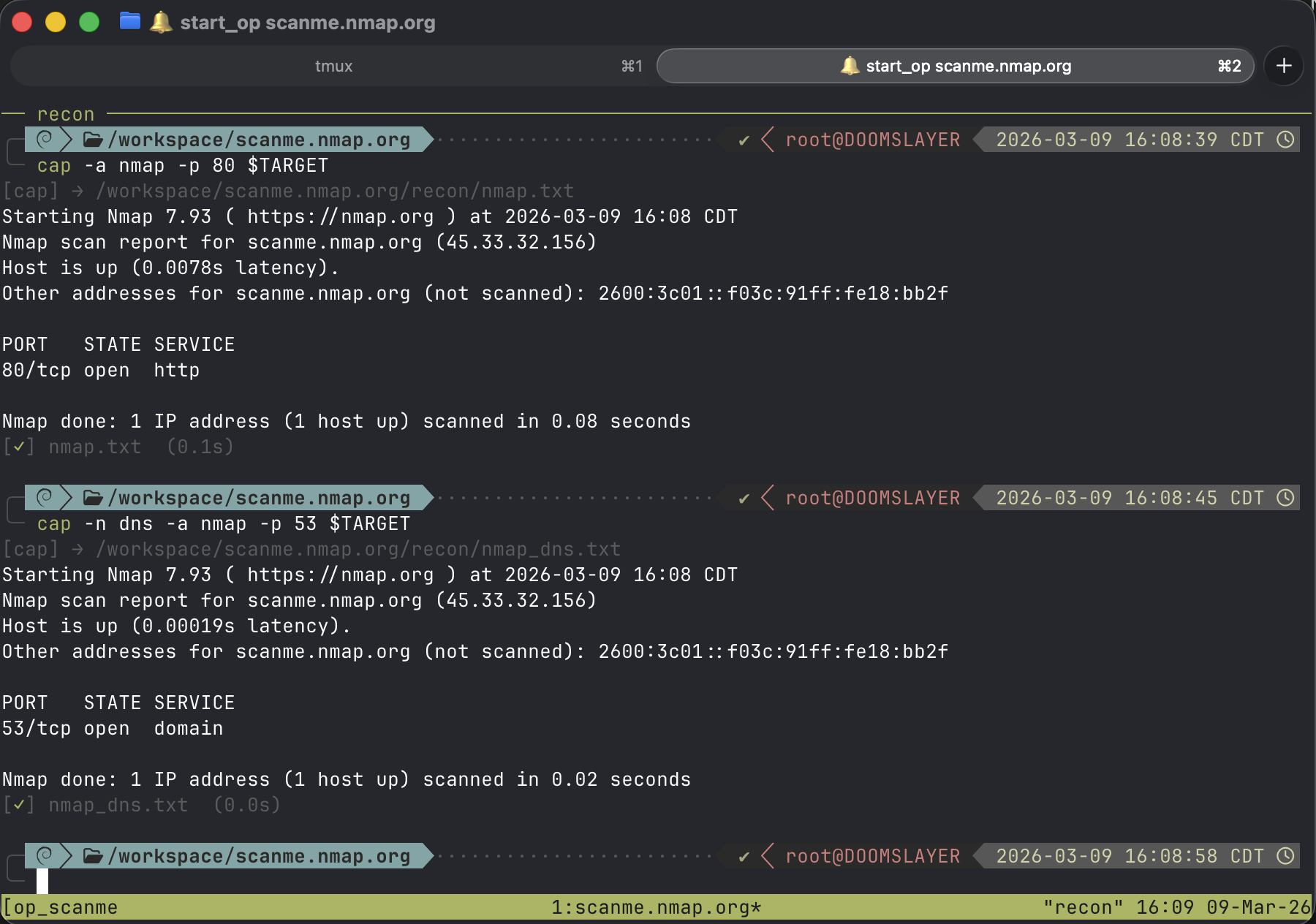 Basic capture — output routes automatically based on engagement context
How It Works#
Drop cap in front of any command. NOCAP handles the rest.
Smart File Naming#
NOCAP generates clean, descriptive filenames by analyzing your command. It keeps meaningful flags and strips everything that’s noise — IPv4 and IPv6 addresses, URLs, paths, wordlists, port numbers, and hostnames.
| Command | Output File |
|---|---|
cap nmap -sCV 10.10.10.5 | nmap_sCV.txt |
cap nmap -p- --min-rate 5000 10.10.10.5 | nmap_p-_min-rate.txt |
cap gobuster dir -u http://10.10.10.5 -w /usr/share/seclists/... | gobuster_dir.txt |
cap netexec smb 10.10.10.5 -u admin -p pass | netexec_smb.txt |
cap feroxbuster -u http://10.10.10.5 -x php,html | feroxbuster_x_phphtml.txt |
The logic is deliberate: flags like -sCV tell you what kind of scan you ran. The target IP doesn’t — you already know what you’re scanning. Wordlist paths are noise. Port numbers are noise. The flags that change behavior are signal. NOCAP keeps the signal.
Run the same command twice? No collision. Files auto-increment: nmap_sCV.txt → nmap_sCV_2.txt → nmap_sCV_3.txt. The collision avoidance is atomic — race-safe even if you fire off multiple captures simultaneously.
Add a note when the context matters:
cap -n post-auth netexec smb 10.10.10.5 -u admin -p 'Password1' --shares
# → netexec_smb_shares_post-auth.txt
Not sure where a command will route? Dry-run it:
cap -D nmap -sCV 10.10.10.5
Shows you the exact output path without running anything. Useful when you’re setting up a new engagement and want to validate your routing before committing to a scan.
Engagement Routing#
This is where NOCAP earns its keep on real engagements. Set your target and every capture routes automatically:
export TARGET=10.10.10.5
cap nmap -sCV 10.10.10.5
# → /workspace/10.10.10.5/nmap_sCV.txt
No manual directory management. No mkdir -p. No cd into the right place first.
The routing priority is simple:
$TARGETenv var — set it and everything routes to/workspace/<target>/(override the base path with$NOCAP_WORKSPACEif/workspacedoesn’t fit your setup)- tmux session — name your session
op_10_10_10_5and NOCAP picks up the target automatically - Fallback — no engagement context? Writes to the current directory. No surprises.
The tmux integration is the one I use most. I name every engagement session with the op_ prefix. NOCAP reads the session name, extracts the target, and routes output — without me setting a single environment variable.
Auto-Subdir Routing#
NOCAP knows where your tools belong. Pass -a or set NOCAP_AUTO=1 and it files output into the right subdirectory based on what you’re running:
# per-command with -a
cap -a nmap -sCV 10.10.10.5          # → recon/nmap_sCV.txt
cap -a hashcat -m 1000 hashes.txt wl # → loot/hashcat_m.txt
cap -a msfconsole                     # → exploitation/msfconsole.txt

# or make it the default
export NOCAP_AUTO=1
cap nmap -sCV 10.10.10.5             # → recon/nmap_sCV.txt
cap gowitness scan                    # → screenshots/gowitness_scan.txt
Over 250 tools are mapped across four categories: recon, loot, exploitation, and screenshots. Every tool you actually use during an engagement — from nmap to bloodhound-python to impacket’s psexec.py — has a home.
Don’t want auto-routing? Use an explicit subdir. Predefined names (recon, loot, exploitation, screenshots) work as a positional argument, and -s lets you specify any custom subdir:
cap recon gobuster dir -u http://10.10.10.5 -w /wordlist.txt
cap loot hashcat -m 1000 hashes.txt /wordlist.txt
cap -s pivoting chisel client 10.10.14.5:8080 R:socks
cap -s ad-enum bloodhound-python -u user -p pass -d corp.local
Explicit always wins over auto. You stay in control.
The engagement directory ends up looking like this:
/workspace/10.10.10.5/
├── recon/
│   ├── nmap_sCV.txt
│   ├── nmap_p-_min-rate.txt
│   ├── gobuster_dir.txt
│   └── feroxbuster_x_phphtml.txt
├── exploitation/
│   ├── msfconsole.txt
│   └── ligolo-ng.txt
├── loot/
│   └── hashcat_m.txt
└── screenshots/
    └── gowitness_scan.txt
Clean. Consistent. Every engagement. Every time.
Working With Captures#
Saving output is half the battle. Finding it again is the other half.
Quick Access#
cap last                          # print path of the last capture
cap cat                           # dump it to stdout (bat or cat)
cap tail                          # follow from the start — watch a running scan
cap open                          # open in $EDITOR / bat / less
cap rm                            # delete the last capture
cap tail is the one I reach for constantly. Kick off a long scan in one tmux pane, switch to another, run cap tail — you’re following the output live from the beginning. No guessing filenames. No tail -f /workspace/10.10.10.5/recon/nmap_sCV.txt. Just cap tail.
cap last composes with everything:
grep -i password $(cap last)
cp $(cap last) ~/report/evidence.txt
Searching Across Captures#
This is the feature that changed how I work at the end of an engagement. cap summary gives you a bird’s-eye view of everything you’ve captured:
cap summary
2026-02-23 14:32  1234 lines   45.2K  recon/nmap_sCV.txt
2026-02-23 14:28   892 lines   28.1K  recon/gobuster_dir.txt
2026-02-23 13:55   310 lines    9.8K  loot/hashcat_m.txt
But the real power is keyword search. NOCAP ships with built-in patterns for the things you’re always looking for:
cap summary passwords     # credential patterns across all captures
cap summary hashes        # NTLM, MD5, SHA1, SHA256
cap summary users         # usernames, logins, accounts
cap summary ports         # open ports from all nmap output
cap summary vulns         # CVEs, severity: critical/high
cap summary emails        # email addresses
cap summary urls          # HTTP/HTTPS URLs
The patterns aren’t dumb string matches. The passwords pattern catches NetExec [+] CORP\user:pass output, hydra-style login: ... password: ... lines, and generic password: value pairs. The hashes pattern knows the difference between NTLM (32:32), MD5 (32 hex), SHA1 (40 hex), and SHA256 (64 hex).
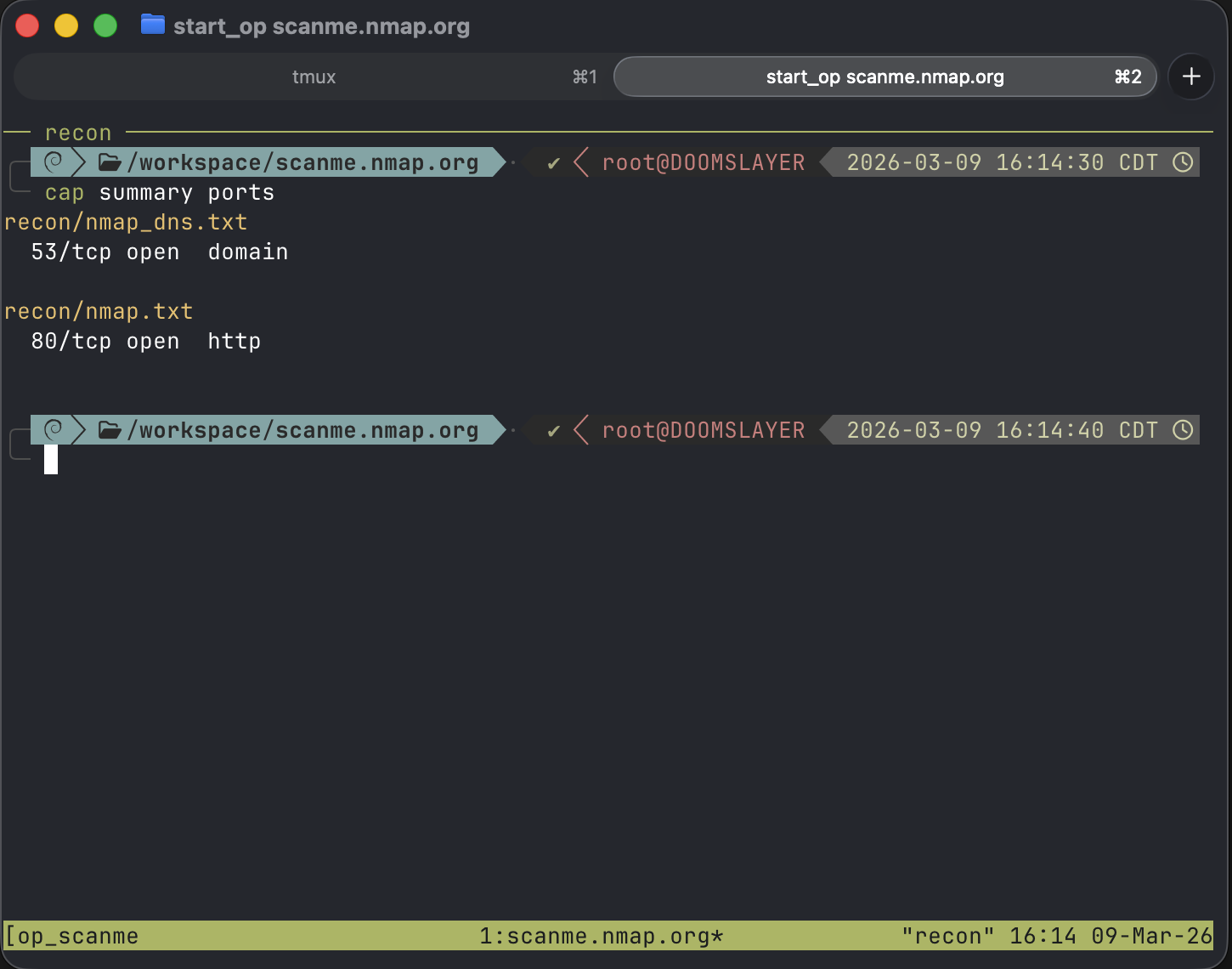 Searching captures for open ports across all recon output
Want something specific? Pass any regex:
cap summary "HTB{.*}"              # HTB flags
cap summary "\d+\.\d+\.\d+\.\d+"  # all IPs across captures
Interactive Browsing#
cap ls                    # fzf browser across all captures
cap ls recon              # scoped to recon/
If you have fzf installed, cap ls drops you into an interactive browser with file preview. Same philosophy as the fzf-wordlists alias from my last post — selection, not recall.
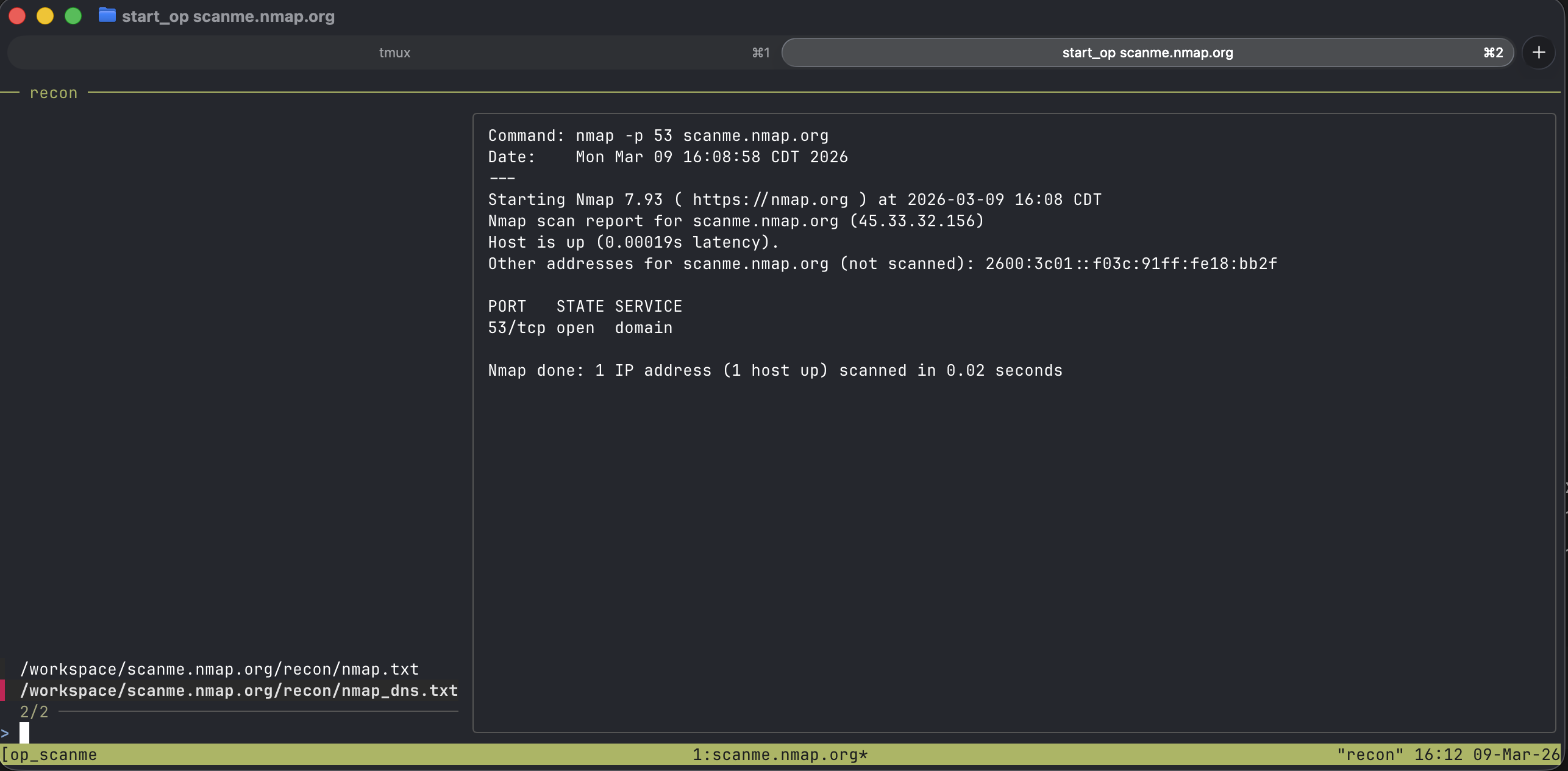 Interactive log browsing with file preview
Why It’s Built This Way#
A few design decisions worth calling out.
Zero dependencies. Standard library Python only. No pip install pulling in a tree of packages. It runs on any system with Python 3.9+. Optional tools like fzf and bat enhance the experience but aren’t required.
True PTY emulation. NOCAP doesn’t just pipe stdout. It forks a pseudo-terminal so tools behave exactly as they would in a normal shell — colors, progress bars, interactive prompts, all preserved. The output file gets the raw data. Your terminal gets the full experience.
Atomic file claiming. Collision avoidance uses O_CREAT | O_EXCL — the OS atomically creates the file or fails if it exists. No time-of-check/time-of-use race conditions. Fire off five captures simultaneously and every one gets a unique file.
ANSI-aware search. When cap summary searches your captures, it strips ANSI escape codes before matching. Tools that output colored text don’t break your keyword searches.
Install#
pipx install git+https://github.com/BLTSEC/NOCAP.git
That’s it. One command. No dependencies. Start prefixing your tools with cap and never lose output again.
If you’re running Exegol, drop the install into your shared resources setup script and it persists across every container.
Keep it current with:
cap update
The Takeaway#
NOCAP exists because the gap between running a tool and organizing its output is a gap where information dies. Every | tee you forget, every scan.txt you can’t find, every time you mix up which engagement directory you’re in — that’s friction. And friction during an engagement isn’t just annoying, it’s a liability.
The best tool is the one that disappears. cap is three characters. It stays out of your way, names things intelligently, puts them where they belong, and gives you powerful ways to find them later.
Your output is your evidence. Stop losing it.
Check out the GitHub repo for the full documentation and tool routing table.