TURN, STUN, and the Blind Spot in Trusted Collaboration Traffic
Your collaboration allow rules can work exactly as designed and still hide command and control.
Real-time communications (RTC) need low-latency media, NAT traversal, and frequently changing vendor infrastructure. To keep calls working, organizations often allow broad UDP egress, bypass proxies, and exempt collaboration traffic from inspection. The destination is trusted, so the traffic inherits that trust.
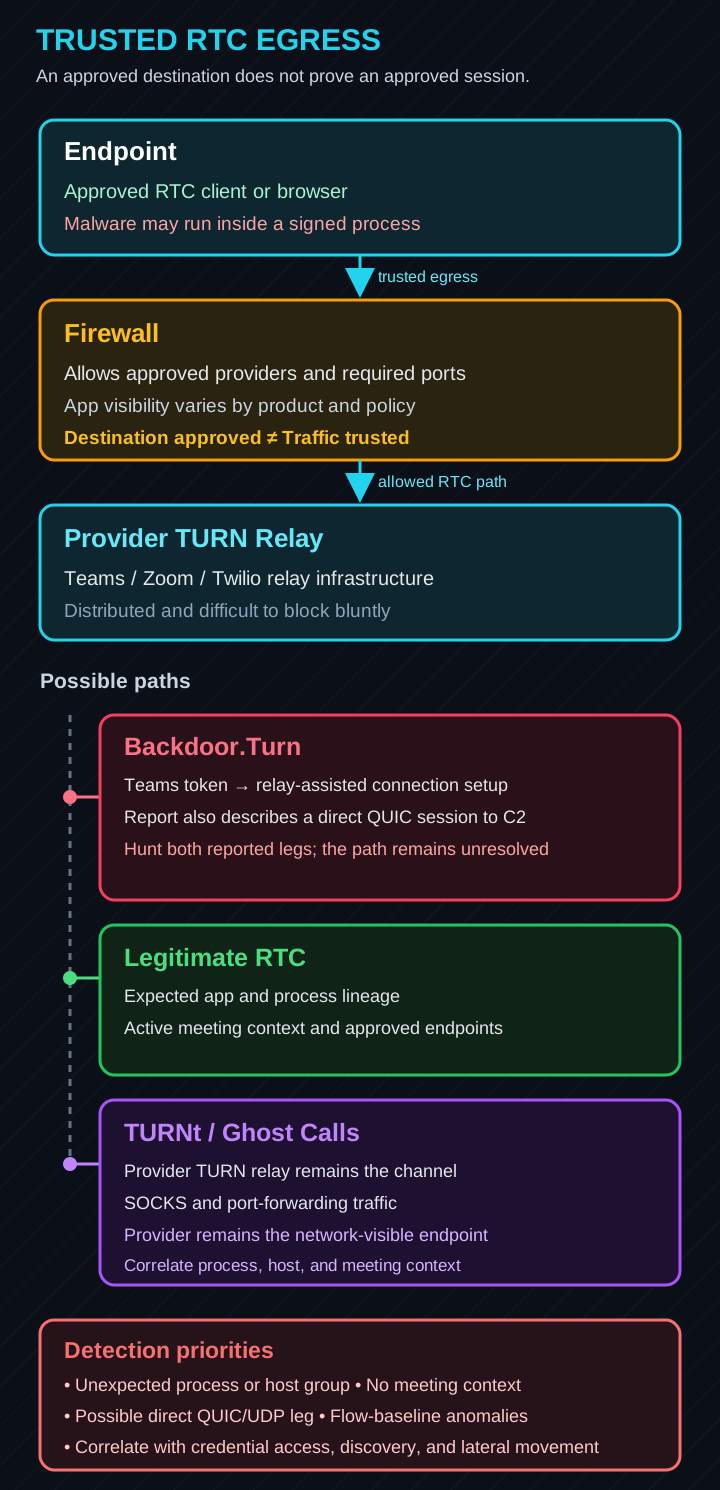
In June 2026, Symantec reported that DragonForce used Backdoor.Turn, a custom Go RAT, during an intrusion at a major U.S. services company. The malware requested an anonymous Teams visitor token, interacted with Teams-associated TURN infrastructure, and established a QUIC session with attacker-controlled command-and-control (C2) infrastructure. Symantec described it as the first known in-the-wild abuse of TURN relay infrastructure in this way.
The backdoor was injected into the signed DbgView64.exe utility and installed after ransomware deployment, possibly for persistence, follow-on access, or resale. The relay technique was not reported as the initial-access path. Its importance is simpler: red-team research on trusted conferencing relays had crossed into ransomware tradecraft.
Reporting caveat: Symantec says the Teams relay assisted connection setup and that the malware then established a direct QUIC session to attacker C2. The report does not explain how that description reconciles with its separate claim that defenders saw only outbound connections to Teams servers. Defenders should cover both the relay leg and a possible direct QUIC/UDP leg rather than build around one interpretation.
Defender TL;DR
- Scope RTC egress to managed users and devices, sanctioned applications, live vendor endpoints, and required services.
- Correlate relay traffic with endpoint process lineage and real meeting or session context.
- Hunt both trusted-relay use and unusual QUIC/UDP flows to unapproved destinations.
- Deny and log unapproved STUN/TURN, harden relays you own, and validate the controls in authorized purple-team exercises.
STUN and TURN in 60 Seconds#
STUN, or Session Traversal Utilities for NAT, helps a client learn its public-facing address and perform connectivity checks across NAT. TURN, or Traversal Using Relays around NAT, gives the client an address on a relay server and forwards traffic when a direct path is unavailable. Interactive Connectivity Establishment (ICE) uses candidates from these mechanisms to find a workable path.
In normal use, that is exactly what you want: if two meeting participants cannot connect directly, the relay keeps the call alive. In an abuse case, the same relay can help establish or carry traffic between attacker-controlled endpoints while the victim network sees an approved RTC provider.
Microsoft, Zoom, Twilio, and other providers publish endpoint and proxy guidance that prioritizes call quality. The exact ranges and ports change, but the operational pattern is consistent: direct media paths, selective proxy bypass, and narrow inspection exceptions. Follow the live Microsoft 365 endpoint feed, Zoom network guidance, or Twilio Network Traversal Service documentation rather than freezing a list in a firewall rule.
Red Team: Three Abuse Paths#
The cases are related, but they are not interchangeable:
| Path | What happens | What the defender sees |
|---|---|---|
| Relay-assisted C2 | Trusted TURN infrastructure participates in connection establishment; the public report then describes a direct QUIC session. | Hunt both the relay contact and a possible separate QUIC/UDP flow to an unapproved destination. |
| Provider relay as the channel | Ghost Calls and TURNt use temporary conferencing credentials and two attacker-controlled endpoints to carry SOCKS or port-forwarding traffic through the provider relay. | A sustained connection to trusted conferencing infrastructure. |
| Misconfigured TURN pivot | A relay permits anonymous allocation, reusable credentials, or access to unintended peer targets, turning it into a proxy to sensitive systems. | Traffic to a relay the organization may already allow, followed by connections from that relay to unintended targets. |
TURNt was not reported in the DragonForce intrusion. It implements the Ghost Calls relay-as-channel approach that Symantec cites as inspiration for Backdoor.Turn. Praetorian demonstrated the approach with Zoom and Teams infrastructure; earlier Slack TURN research showed how inadequate peer restrictions could expose internal and cloud-metadata targets.
Requirements depend on the path:
- Provider relay: an endpoint foothold, a signaling path between the controlled endpoints, valid provider-issued credentials, and egress to the relay.
- Misconfigured relay: a reachable relay, credentials it accepts (or anonymous allocation), and access to unintended peer targets.
Where required, credentials are a gate, not a complete defense. Short-lived, tightly scoped credentials reduce the window; long-lived secrets, anonymous allocation, and access to unintended peer targets expand it. For self-hosted TURN, peer policy determines whether the relay supports only the intended media flow or becomes a general-purpose pivot.
TURNt is most useful as a secondary, high-interaction channel: an operator can turn it on to reach internal applications, proxy tooling, or move data without relying on the primary implant’s transport. That makes it useful in an authorized red-team test; it does not authorize testing against third-party infrastructure.
Blue Team: Constrain and Correlate#
A firewall can confirm that a host reached Microsoft, Zoom, Twilio, or another approved provider. It usually cannot prove that the initiating process was legitimate or that a real meeting existed. Depending on the platform, network telemetry may include the source host or user, destination, port, duration, and byte counts; process and session context normally come from EDR, identity, and collaboration logs.
Start by separating approved RTC use from generic internet access:
| Use case | Allow from | Destination policy | Watch for |
|---|---|---|---|
| Teams/Zoom meeting media | Licensed users on managed endpoints and conference-room systems | Live vendor-maintained endpoints and required services only | Unexpected process lineage, relay use without meeting context, and unusual UDP 443 |
| Embedded RTC/Twilio/Vonage/Agora | Approved app users or application servers | The provider endpoints required by that application | Random workstations or unrelated server groups using the relay |
| Self-hosted TURN | Required application subnets | Owned relays with authentication and explicit peer restrictions | Anonymous allocations, unexpected private or metadata peer targets, and missing allocation logs |
| Unknown STUN/TURN | Nobody by default | Deny and log during discovery | UDP/TCP 3478 and 5349, plus unexplained provider-associated UDP 443 from out-of-scope systems |
Then apply a few durable controls:
- Scope egress by user, device, source subnet, application, destination, and required service. Servers, admin workstations, and unmanaged hosts should not inherit meeting-media access by default.
- Use live destination data. Vendor ranges change. Prefer published feeds, vendor-maintained objects, or automated EDLs over static IP lists.
- Keep exceptions narrow. Do not assume an existing TCP/TLS inspection policy also covers QUIC, DTLS, or SRTP; behavior varies by product, version, and policy. Inspect where it is supported and useful, but do not turn “RTC may break” into a blanket no-inspection rule for all collaboration traffic.
- Correlate the endpoint. Join network events with process ancestry, signer, loaded modules, command line, integrity level, injection or sideloading telemetry, user identity, and meeting/session context.
- Harden relays you own. Require authentication, keep credentials short-lived and scoped, restrict peer targets, deny private/link-local/loopback/multicast/reserved/metadata ranges where appropriate, and log allocations.
On Palo Alto, combine App-ID, User-ID and device context, dynamic destination objects, application-default where practical, security profiles, and logging on the dedicated RTC rules. SSL Forward Proxy can improve visibility on supported TLS paths, but it does not replace endpoint correlation.
On FortiGate, use scoped firewall policies with FQDN or Internet Service Database objects, Application Control, SSL/SSH Inspection, DNS/Web controls, IPS, and centralized analysis. Test deep inspection against real calls and document only the exceptions the application requires.
Detection Priorities#
Process mismatch is a useful starting point, not a verdict. Backdoor.Turn ran inside signed DbgView64.exe; an operator could also inject into a browser, WebView host, or VDI media helper. Validate ancestry, modules, signer, and behavior before deciding a process is trusted.
| Signal | Why it matters |
|---|---|
| RTC relay traffic from servers, admin systems, unmanaged hosts, or unexpected process trees | The source is outside the normal collaboration population. |
| Relay allocation without corresponding call or application context | The destination is valid, but the session may not be. This requires collaboration telemetry where available. |
| An unusual QUIC/UDP flow to an unapproved destination after Teams relay contact | Covers the directly egressing interpretation of Backdoor.Turn without assuming a fixed QUIC port. |
| Sustained TCP/TLS TURN sessions or unusual upload volume | TCP fallback and long calls can be normal; an interactive tunnel should be tested against the local baseline. Pull byte counts from firewall or flow telemetry. |
| Tunneling or port-forwarding artifacts on either controlled endpoint near relay traffic | Strong evidence of operator-driven activity; host-side artifacts vary by tool and role. |
| Relay activity near BYOVD, credential dumping, LDAP/AD discovery, RDP/SMB, or internal scanning | Kill-chain context raises an otherwise weak network signal. |
The goal is not to label every relay connection malicious. It is to answer a better question: can the SOC distinguish a meeting from an interactive tunnel using the same infrastructure?
Hunting Appendix#
These starter queries find repeated Teams-associated UDP events from unexpected processes. KQL uses a 30-minute bucket; Falcon counts events in the search window you select. They are IPv4-only triage aids, not proof of compromise or production detections.
They also do not cover TURNS over TCP 443, which needs a separate provider-specific hunt. Process-name allowlists are brittle, the Microsoft ranges are examples that must come from the live endpoint feed, and endpoint events do not provide authoritative flow duration or byte volume. Correlate the results with firewall/NetFlow, process history, injection or sideloading signals, and real meeting context.
Microsoft Defender for Endpoint / Sentinel — KQL (DeviceNetworkEvents)
// Teams UDP-side triage: process mismatch on Teams-associated egress
// Table: DeviceNetworkEvents (Microsoft Defender for Endpoint / Sentinel)
// Scope: IPv4 process + destination + event count. Not sessions or byte volume.

// Teams IPv4 ranges from Microsoft 365 endpoint sets 11 and 12.
// These change. Source them from the live M365 endpoints JSON or an EDL.
let TeamsIPv4Ranges = dynamic([
    "52.112.0.0/14",
    "52.122.0.0/15"
]);

// Tune this to your environment. WebView2/browser allowances are convenient,
// but they also create blind spots for browser-based RTC and injected processes.
let AllowedRtcProcesses = dynamic([
    "ms-teams.exe",
    "teams.exe",
    "msteams.exe",
    "msedgewebview2.exe"
]);
let AllowedBrowsers = dynamic([
    "msedge.exe", "chrome.exe", "firefox.exe"
]);

DeviceNetworkEvents
| where Timestamp > ago(7d)
| where RemoteIPType == "Public"
// Endpoint set 11 publishes UDP 3478-3481; set 12 also includes UDP 443.
// A directly egressing QUIC-to-attacker leg needs a separate UDP hunt against unapproved destinations.
| where Protocol =~ "Udp"
| where (RemotePort between (3478 .. 3481)) or RemotePort == 443
| where ipv4_is_in_any_range(RemoteIP, TeamsIPv4Ranges)
| extend ProcName = tolower(InitiatingProcessFileName)
| where ProcName !in (AllowedRtcProcesses)
| where ProcName !in (AllowedBrowsers) // remove this line to flag browser RTC too
| extend WindowStart = bin(Timestamp, 30m)
| summarize
    ConnCount      = count(),
    FirstSeen      = min(Timestamp),
    LastSeen       = max(Timestamp),
    DistinctDstIPs = dcount(RemoteIP),
    Ports          = make_set(RemotePort, 16),
    SampleCmdLine  = any(InitiatingProcessCommandLine),
    ProcPath       = any(InitiatingProcessFolderPath),
    ParentProcess  = any(InitiatingProcessParentFileName),
    Integrity      = any(InitiatingProcessIntegrityLevel)
    by WindowStart, DeviceName, ProcName, InitiatingProcessAccountName
| where ConnCount >= 20
| sort by ConnCount desc
CrowdStrike Falcon — NG-SIEM/LogScale (CQL) and legacy Event Search (SPL)
Falcon's NetworkConnectIP4 provides process attribution, not authoritative volume. Field names and function support vary by version, so validate the protocol value (17 = UDP), the RemotePort type (number vs *_decimal), and multi-subnet cidr() support in your tenant.
// Teams UDP-side triage — CrowdStrike Falcon
// Destination is Teams-associated infrastructure; the calling process is not Teams.

// (A) NG-SIEM / LogScale — CQL  (repository: search-all)
#event_simpleName=NetworkConnectIP4
// 17 = UDP. Endpoint set 11 publishes 3478-3481; set 12 also includes 443.
| Protocol=17 AND (RemotePort=3478 OR RemotePort=3479 OR RemotePort=3480 OR RemotePort=3481 OR RemotePort=443)
// Teams IPv4 ranges — source these from live M365 endpoints; they change.
| cidr(RemoteAddressIP4, subnet=["52.112.0.0/14", "52.122.0.0/15"])
| join({#event_simpleName=ProcessRollup2}, field=[aid, ContextProcessId], key=[aid, TargetProcessId],
        include=[ImageFileName, CommandLine])
// drop legitimate RTC binaries; msedgewebview2.exe also hosts Electron apps, so it is itself a blind spot
| ImageFileName != /\\(ms-teams|teams|msteams|msedgewebview2)\.exe$/i
// event count: one network event is noise; repeated non-Teams egress deserves triage
| groupBy([aid, ComputerName, ImageFileName],
          function=[count(as=ConnCount), collect([RemoteAddressIP4, RemotePort, CommandLine])])
| ConnCount >= 20
| sort(ConnCount, order=desc)


// (B) Legacy Event Search — SPL  (tenants not yet on NG-SIEM)
event_simpleName=NetworkConnectIP4
  Protocol_decimal=17
  (RemotePort_decimal=3478 OR RemotePort_decimal=3479 OR RemotePort_decimal=3480
   OR RemotePort_decimal=3481 OR RemotePort_decimal=443)
| where cidrmatch("52.112.0.0/14", RemoteAddressIP4)
     OR cidrmatch("52.122.0.0/15", RemoteAddressIP4)
| rename ContextProcessId_decimal as TargetProcessId_decimal
| join aid TargetProcessId_decimal
    [ search event_simpleName=ProcessRollup2
      | fields aid TargetProcessId_decimal ImageFileName CommandLine ]
| regex ImageFileName!="(?i)\\\\(ms-teams|teams|msteams|msedgewebview2)\.exe$"
| stats count AS ConnCount values(RemoteAddressIP4) AS dst values(RemotePort_decimal) AS ports
        values(CommandLine) AS cmd by aid ComputerName ImageFileName
| where ConnCount >= 20
| sort - ConnCount
Purple Team: Test It Safely#
Do not test third-party conferencing infrastructure without explicit authorization. Use owned lab infrastructure or a pre-coordinated exercise, then work up a simple ladder:
- Inventory approved RTC providers, source populations, ports, destination objects, proxy/TLS exceptions, and VPN split-tunnel rules.
- Baseline usage by host group, process, provider, transport, duration, and byte count.
- Validate benignly with Trickle ICE, coturn turnutils, or Nmap’s stun-info and stun-version scripts against systems you own.
- Audit owned relays for authentication, credential lifetime, peer restrictions, allocation logging, and blocked address classes.
- Simulate in scope with TURNt, Stunner, StunCheck, or Turner. Capture firewall, DNS, EDR, identity, and collaboration telemetry, then measure which control actually fired.
That gives the exercise a clear progression: Inventory → Baseline → Validate → Audit → Simulate.
Questions for RTC Vendors#
Before approving a broad firewall exception, ask:
- Which features require STUN/TURN, and which provider operates the relay?
- How long do client credentials live, and are they bound to a tenant, user, device, meeting, session, or peer?
- Can an authenticated client select arbitrary peer addresses? Which private, loopback, link-local, metadata, multicast, and reserved ranges are denied?
- Can customers obtain allocation, peer, duration, and byte-count logs?
- How should customers allow the application while denying generic STUN/TURN from unrelated systems?
- Is the relay dedicated, multi-tenant, or shared through another RTC, CDN, or cloud provider?
If the vendor cannot answer those questions, the exception should not be broad.
The Takeaway#
STUN and TURN are not malicious. They solve a real connectivity problem. The risk appears when an organization treats an approved destination as proof of an approved application and session.
Allow the collaboration tools the business needs, but scope their paths, use live destination data, log the exceptions, correlate network activity with endpoint and meeting context, and test the controls from both sides. If the firewall can tell you only that a host reached a Teams server on an approved port, it has verified the destination—not the meeting.